
“Not indexed” is not a diagnosis. A retired page should stay out of Google; a service page that disappeared from search may deserve immediate attention. The useful question is not how many URLs are excluded. It is which important URL is missing, why, and what decision should follow.
This 30-minute audit is built for a small service or ecommerce site, not a full technical crawl. You will leave with a short list of URLs, a reason you have checked rather than guessed, and an owner for each next action. You will not leave with a promise that Google will index every page: Google’s Page indexing report guide says some exclusions are normal and inclusion is never guaranteed.
Minutes 0-5: decide which pages should be indexed
Start with business importance, not the largest count in a report. Choose five to ten canonical URLs that represent the site’s job: the homepage, two or three core services or categories, a location page if it has a real purpose, and one recent article that supports a commercial page. For each URL, write whether you actually want it in search. A thank-you page, filtered variant, or retired offer might be correctly excluded.
This distinction prevents the classic “fix every gray URL” project. Google explicitly says a duplicate, a removed page returning 404, or an intentionally noindex page can be absent for the right reason. Its report may also contain URLs Google discovered but you never meant to promote. Judge the status against your intended URL inventory, not against a target of 100% indexed pages.
Use a quick priority table to keep the investigation focused:
| Priority URL | Why it matters | Hypothetical finding | First decision |
|---|---|---|---|
https://example.com/services/analytics/ | Core commercial offer | noindex detected | Check the live template and remove the directive if accidental |
https://example.com/services/seo/ | Core commercial offer | Google chose /services/ as canonical | Compare content and canonical signals before changing either page |
https://example.com/blog/measurement-guide/ | Supports the analytics offer | Discovered, not crawled | Confirm a crawlable internal link and sitemap entry; monitor |
https://example.com/thanks/ | Post-form confirmation | Excluded intentionally | Leave it alone |
https://example.com/old-offer/ | Retired page | 404 with a relevant replacement | Redirect to that replacement if the old URL still has links or users |
For a small site, this shortlist is often more useful than a dashboard total. Google’s Page indexing documentation even suggests that sites under roughly 500 pages may not need to work through the entire report; inspecting key URLs is the more direct starting point.
Minutes 5-12: read the Page indexing report correctly
In the relevant Search Console property, open Indexing > Pages. Confirm you are viewing the right domain or URL-prefix property before drawing conclusions. Then look at the indexed/not indexed trend and the Why pages aren’t indexed table. Filter to All submitted pages if your sitemap represents your intended search inventory. Google’s report documentation explains that this filter covers URLs in submitted sitemaps, while the examples table for a reason is limited and is not a complete URL export.
Look for changes that affect important pages: a new noindex group after a release, a server-error spike, or an unexpected canonical choice on a service template. Do not assume a high “Not indexed” total is itself a crisis. A catalog with many sorting parameters can produce many legitimate duplicate URLs; one blocked pricing page can matter far more than all of them combined.
Record a baseline in one sentence: “Our priority service URLs are present except X and Y; the largest new reason is Z.” If the report has not yet caught up with a recent change, URL Inspection is the better place to check an individual page. Google notes that a page may already be indexed in URL Inspection before it appears in the Page indexing report.
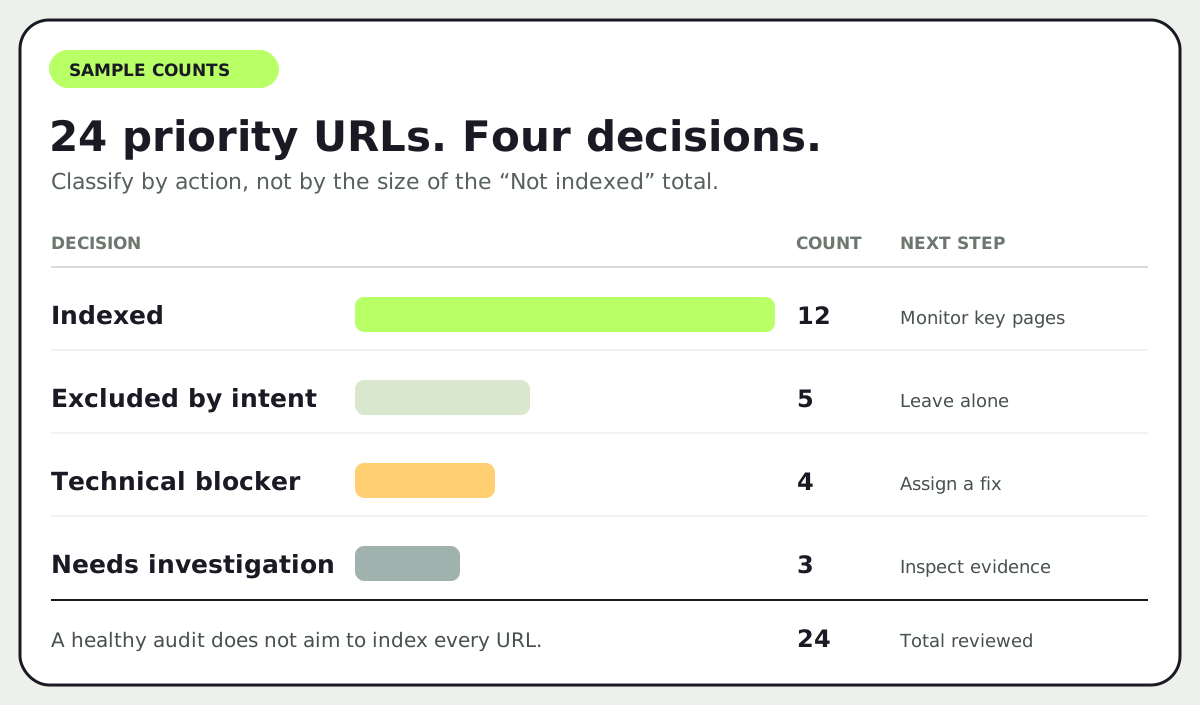
The point of this view is decision coverage, not a vanity “indexation rate.” A page intentionally excluded should not be put into the same repair queue as a blocked service page. A URL needing investigation should not be called a technical defect until you have inspected it.
Minutes 12-22: inspect representative URLs, not every row
Pick two or three representative URLs from the highest-priority reason groups and paste each full URL into the inspection bar. Read the Google Index result first: last crawl, page fetch, indexing allowed, user-declared canonical, and Google-selected canonical when available. Then use Test live URL to see whether the current version differs from what Google last recorded. Google’s URL Inspection guide stresses that the indexed result is historical, while the live test checks the current page. The live test does not establish which URL Google will choose as canonical or guarantee indexing.
Write two columns in your notes: last Google-observed state and live state now. That small separation avoids a wasted fix. If the indexed result says noindex but the live test shows the directive is gone, the site may already be repaired and waiting for a recrawl. If both states show noindex, the template or response header still needs work.
Use the reason as a branch in a decision tree:
noindex: Inspect the live HTML and response headers for a robots meta tag orX-Robots-Tag. Remove an accidental directive from the intended page. Do not try to solve this by editingrobots.txt: Google must be able to crawl the page to seenoindex, as its index-blocking guide explains.- Blocked by
robots.txt, 401, 403, or 5xx: Ask whether the page should be publicly crawlable. Check the rule, authentication, or server response that Google encountered. A browser view for a logged-in editor does not prove Googlebot can fetch the page. Use the live test and server evidence rather than assuming the report is wrong. - Duplicate or different Google-selected canonical: Compare the inspected URL with the selected canonical. If they serve essentially the same purpose, an exclusion may be correct. If they should be distinct, check the canonical tag, redirects, internal links, and whether the content really differs. Google says it may choose a different canonical even when you declare one; the canonical troubleshooting guide recommends checking both technical signals and page distinctiveness.
- Discovered, currently not indexed: Google knows the URL but has not crawled it yet. Check whether the URL is linked from a relevant page, appears in the intended sitemap, and is accessible. Do not diagnose a content-quality problem from this label alone. Google notes that the last crawl date is empty in this state.
- Crawled, currently not indexed: The page was fetched but not selected for the index. Check for thin overlap with another page, an unclear purpose, or a stale status. The report says resubmitting the URL for crawling is not inherently needed. A stronger page and clearer internal context may matter more than pressing Request Indexing repeatedly.
The worksheet below turns that comparison into an owner and a retest condition.
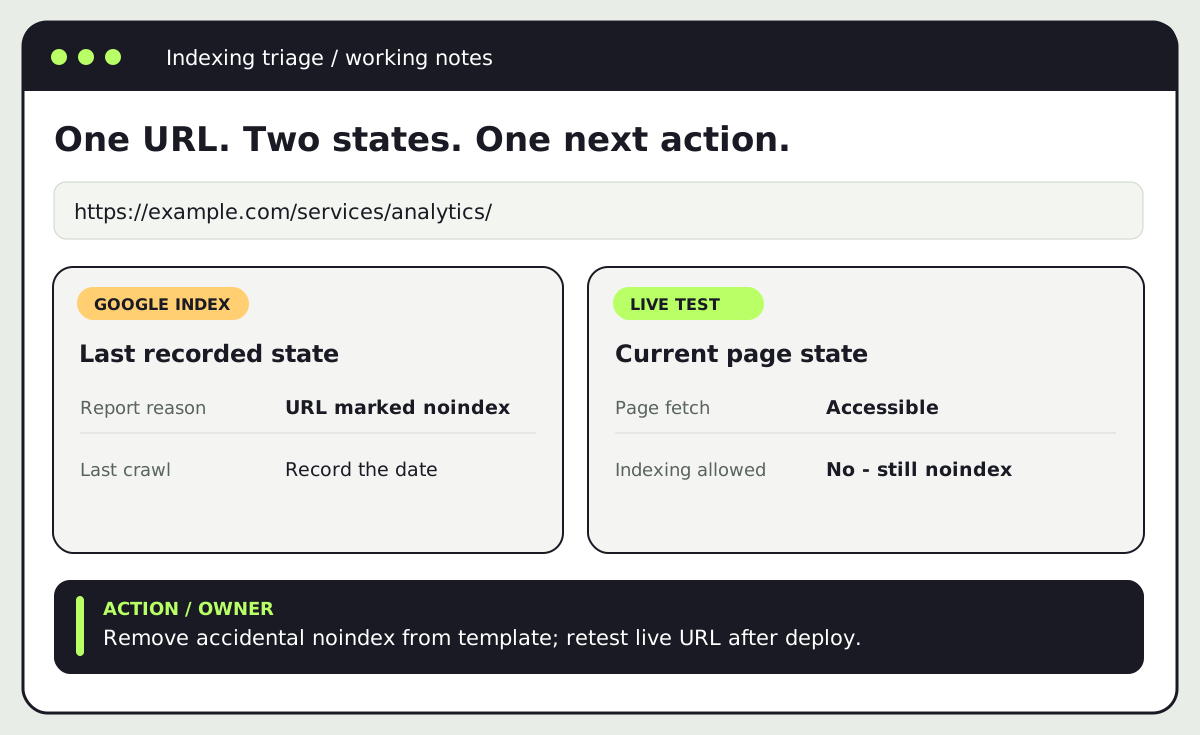
Example worksheet, not a live Search Console report.
For the example analytics service page, the useful finding would be: “The intended URL is missing; the indexed view shows noindex; the live test still detects it; the owner is the web developer; retest after the template change.” That is actionable. “Google isn’t indexing our site” is not.
Minutes 22-27: choose a fix and a valid retest
Assign one action per priority URL. An accidental noindex or 5xx response is a technical fix. A duplicate service page may need consolidation, a better canonical implementation, or a more distinct offer, depending on the evidence. A page that should remain excluded needs no repair ticket. If you cannot identify the cause in this short pass, assign a deeper investigation rather than inventing a reason.
After a genuine fix, use Test live URL to confirm what Google can access now. For a fixable error group, use Validate Fix when the report offers it and the affected URLs are repaired. For a handful of important changed pages, URL Inspection offers Request Indexing; for many URLs, keep the sitemap accurate. Google’s recrawl guidance says repeated requests do not speed up crawling and no request guarantees inclusion. A sitemap helps discovery, but it is not an indexing command.
Avoid submitting a sitemap full of redirects, blocked URLs, and alternate versions just to raise a “submitted” count. Use the sitemap as a clean list of preferred public URLs. If a page moved, update internal links to the destination and make sure a redirect reaches the relevant replacement. If a page intentionally vanished with no replacement, a 404 may be the correct state. Google’s Page indexing guide recommends focusing 404 repairs on URLs you still link to or submit, or on pages that actually moved.
Minutes 27-30: hand off a small, measurable backlog
End with a three-line record for each issue: URL, owner and change, retest condition. For example: “/services/analytics/ — web developer removes template noindex — live inspection shows indexing allowed; review indexed state after recrawl.” Keep the date and the report reason so you can distinguish a new problem from a stale Search Console observation.
If every technical signal looks sound but the page remains unindexed, do not promise that a tag change will solve it. Review whether the page answers a distinct search need and offers information worth indexing. Google’s people-first content guidance asks whether a page adds original value and leaves readers with enough to achieve their goal. That is a content decision, not a “coverage error” to clear.
This audit fits between Twigu’s broader website launch checklist and 90-day SEO roadmap: the launch guide prevents avoidable release mistakes; this triage tells you what to inspect when an important URL is already missing. If the backlog reveals a site-wide template or architecture problem, our SEO service can help turn the findings into a scoped fix plan.
