
A service website can report more “leads” than the sales team actually receives. A button click may be counted as a conversion. A form event may fire before the server accepts the request. An email link may open a draft that the visitor never sends. In each case, the dashboard is recording an interaction, not necessarily an enquiry.
This audit is for marketing and web teams who need to answer one question: when GA4 reports a lead, what happened in the business? You do not need a complex attribution model to start. You need a clear definition, a test that follows the full path, and a way to compare events with the receiving system.
Google’s enhanced measurement documentation describes form_start and form_submit as form-interaction events. Its recommended events guide lists generate_lead for a submitted form or request for information. Those names are useful, but the implementation must still be checked against what your form actually does.
Define the lead before opening GA4
Write down the operational definition with whoever handles enquiries. For a contact form, a defensible starting point is “the receiving system accepted the request and the team can find it in the inbox or CRM.” That is stronger than “the visitor pressed Submit.” For a booking flow, the confirmation may be a completed booking record. For a phone CTA, a tap is only call intent unless you have a reliable call-completion signal.
Do not combine enquiries, newsletter requests, support messages, and job applications into one lead total. Each action may matter, but they answer different business questions. If the team later wants qualified-lead reporting, define that stage separately in the CRM. Google also lists lead-stage events, including qualify_lead, but qualifying a person is not the same event as receiving the first enquiry.
Use this event matrix as a starting point. The event names in the “custom” rows are an implementation example, not a claim that every GA4 property already contains them.
| Observed action | Possible signal | What it proves | Count as a lead? |
|---|---|---|---|
| Visitor loads a contact page | page_view | The page was loaded | No |
| Visitor begins typing | form_start if form interactions are enabled | Someone interacted with a form | No |
| Browser emits a form submit event | form_submit if detected | A submission interaction was observed | Not without checking the receiving system |
| Application confirms a successful request | lead_submission_success in the data layer, then GA4 generate_lead | A specific request passed the site’s success condition | Yes, after validation |
| Email application opens a prepared draft | Optional custom email_draft_opened | The visitor was offered an email draft | No |
| CRM marks an enquiry as sales-qualified | CRM stage, optionally mapped to qualify_lead | The sales team accepted the lead’s fit | Separate downstream measure |
Google calls a business-important event a key event. Marking an event as key does not make its trigger accurate. Audit the trigger first; then choose which verified event deserves key-event status.
Map every form to its real success signal
List the forms and calls to action that people could mistake for a lead. Include contact forms, audit requests, demo bookings, newsletter boxes, phone links, and mailto: links. For each, record the page, the expected destination, the owner of that destination, and the exact success signal.
Three common implementations need different tests:
- Traditional form to a server: The browser submits, the server responds, and a confirmation page or message appears. Check whether that confirmation can happen when the request failed or was blocked as spam.
- JavaScript or AJAX form: The page may prevent the normal submit, call an API, and show success later. Fire a lead event from the confirmed success path, not merely from a click or a generic DOM submit listener.
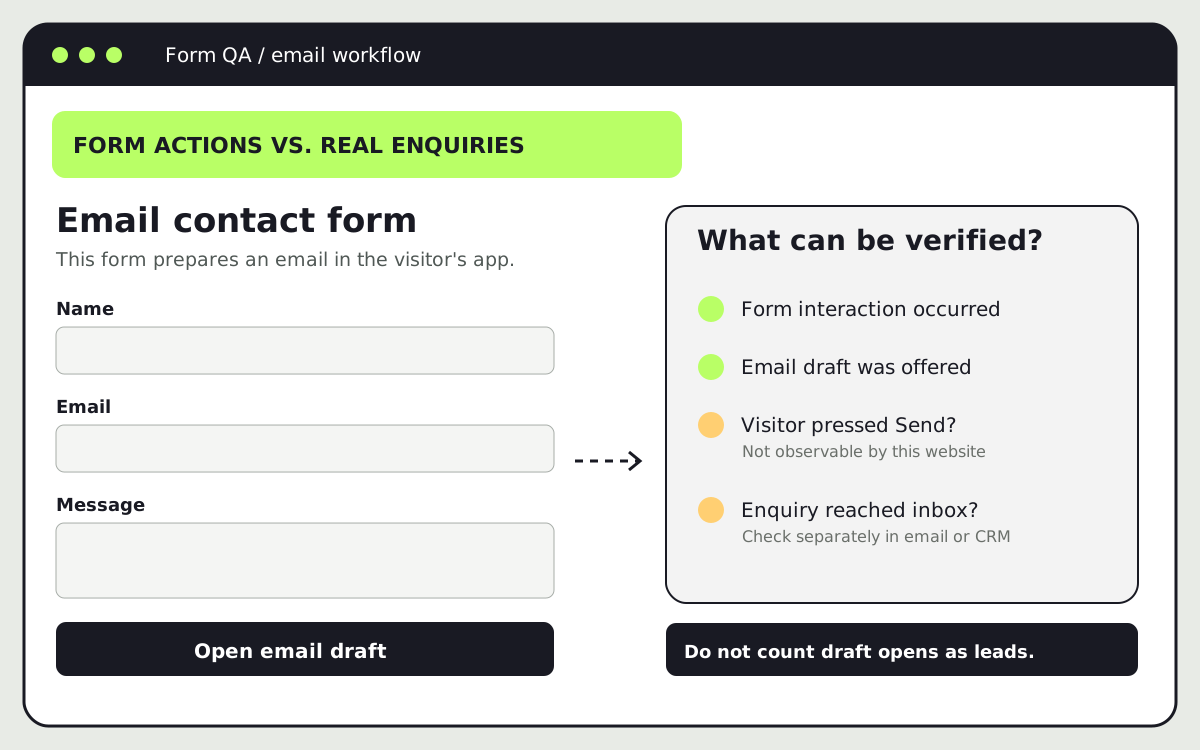
mailto:form: The site prepares an email in the visitor’s app. The website cannot observe whether the visitor pressed Send, whether the email was delivered, or whether it reached the team. An “email draft opened” event can measure intent, but it should not be namedgenerate_lead.
The third case is particularly easy to misread. A site may show “Your email app should open with a draft” after a form submit handler redirects to a mailto: URL. That message is honest: it says the send still has to happen. If a tracking tag fires at the handler, the resulting number is draft-open attempts, not confirmed enquiries. The right fix is either to use a real submission endpoint with a verifiable success response or to report inbox-received enquiries separately until one exists. Do not invent a browser-side confirmation that the email was sent.
Trace one test enquiry through the whole path
Use a distinct test enquiry, such as a message that says “tracking QA test, 1 October.” Do not place a real person’s name, email address, phone number, or message text in GA4 event parameters. Google’s PII guidance warns against sending information such as email addresses to Analytics, including through URLs and user-entered form fields.
Start with the normal visitor journey, not the reporting screen. Open the page in a browser that can complete the form. Confirm consent settings permit the test where applicable. First try an invalid submission and note whether any lead event fires. Then submit the valid test once. Record the visible confirmation, the server or CRM record, and whether the receiving inbox got the message. Keep the test’s timestamp so you can match it to the debug session without sending personal data to GA4.
If the site uses Google Tag Manager, open Preview in the workspace and connect to the test URL. Tag Assistant preview shows which tags fired, which did not, and the order of events. Watch for an early click trigger, multiple GA4 event tags firing for one action, or a trigger that fires on invalid attempts. Google’s form-submission trigger guide distinguishes attempted submissions from validated ones when “Check Validation” is used; even so, a JavaScript form’s business success may occur after that browser trigger. The application success state remains the stronger source of truth.
Next, open GA4 Admin > Data display > DebugView on the test property. Google’s DebugView guide says debug mode must be enabled, for example through Tag Assistant or preview mode. Check that the test device appears and that the expected event arrives once. Inspect its event name and non-personal parameters, such as a stable form type or page category. If nothing appears, check whether the tag loaded, consent blocked it, the wrong property was selected, or the tag was not fired. An empty DebugView alone does not prove that the website received no enquiry.
Finally, compare the event with the receiving system. Did the email arrive? Did the CRM create exactly one record? Was a spam filter involved? A positive GA4 event and a missing enquiry means the audit failed, even if Tag Assistant shows a green “fired” label. Conversely, a real enquiry with no GA4 event means tracking is incomplete, not that the business received no lead.
Find the gap between clicks and enquiries
The funnel below shows where evidence changes: from browser activity to backend acceptance and then to an operational record.
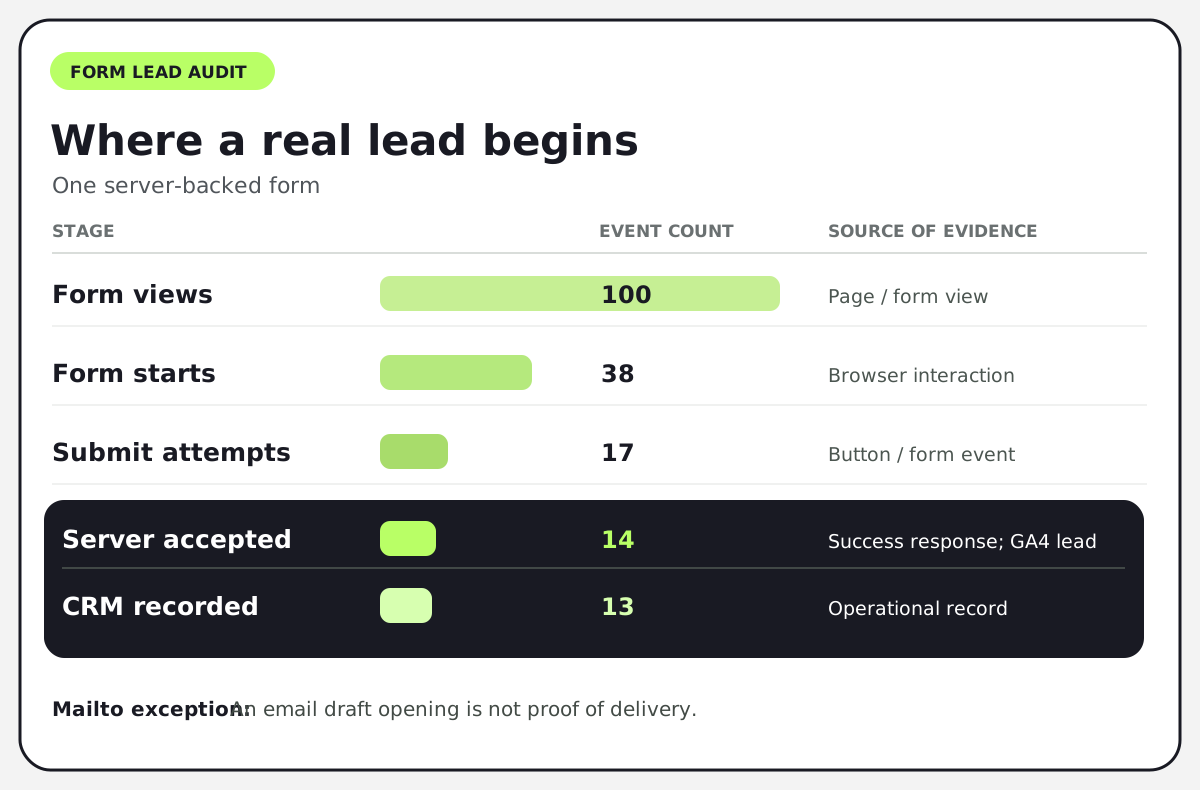
If a dashboard says 17 leads because 17 people attempted to submit, it overstates the 14 server-accepted requests in this sample. If GA4 shows 14 generate_lead events but the CRM has 13 records, investigate the missing record before declaring the tracking finished. It might be a spam decision, a delivery error, an integration failure, or a duplicate in one system. Do not assume which explanation is true without inspecting the logs.
For a mailto: flow, the funnel stops being observable at “draft opened” on the website. You can still count received messages from the inbox, but you cannot reliably connect each one to a GA4 browser event without another consented, technically sound mechanism. Keep those metrics separate. A small honest report is more useful than a precise-looking conversion rate built from incompatible counts.
Fix the failure you found, not the metric you dislike
If invalid submissions fire a lead event, move the trigger to the validated success response. If both automatic form_submit and a custom generate_lead event are marked as key events for the same action, decide which one represents the actual enquiry and remove the duplicate business count. If a single successful request produces two generate_lead events, inspect repeated listeners, tag duplication, and redirects.
If consent blocks Analytics, do not silently bypass it for prettier numbers. Document the resulting measurement gap and follow the consent rules that apply to the site. If the CRM count is larger than GA4, check whether some leads arrive by phone, direct email, offline outreach, or blocked browsers. GA4 is a view of instrumented website behavior, not a universal sales ledger.
For an AJAX form, ask the developer for a single, durable success signal. One practical pattern is to push lead_submission_success to the data layer only after the API confirms acceptance, then map that event to one GA4 generate_lead tag. Avoid sending the submitted fields or a unique person’s details as parameters. Retest an invalid response, a network failure, a normal success, and a duplicate-click scenario before publishing the container.
A 30-minute audit checklist
- Minutes 0-5: Agree which action is a real enquiry and identify its inbox, CRM, or server record.
- Minutes 5-10: Inventory every contact path; label each as server form, AJAX form, booking flow, call link, or
mailto:flow. - Minutes 10-20: Run one invalid and one valid test in Tag Assistant and GA4 DebugView. Record which events fired and how many times.
- Minutes 20-25: Verify the valid test in the receiving system. Investigate any event with no corresponding request or request with no event.
- Minutes 25-30: Write an owner, a fix, and a retest condition for each gap. Do not mark
generate_leadas a key event until it represents the action you agreed to count.
The audit is complete when the team can explain the gap between form views, attempted submissions, accepted requests, and qualified opportunities. It is not complete just because an event appears in DebugView. For a broader measurement plan, see Twigu’s marketing measurement framework and website launch checklist. If the lead path is part of a wider organic growth project, our SEO service includes measurement planning alongside page and content work.
The funnel figures are illustrative, not Twigu or client results.
